For information on the latest version, please have a look at GL013304.
6.6.6. realtime_control_sample.cpp
This example (6_realtime_control_sample.cpp) demonstrates the minimal procedure required
to execute real-time (RT) control of the robot using.
1 ms high-frequency servo commands (
servoj_rt),quintic trajectory generation (5th order polynomial),
real-time thread scheduling (Linux/Pthread or Xenomai),
and safety-aware RT mode activation.
Caution
Realtime monitoring and control are supported only on a real robot system. This sample must be executed with a real controller IP.
Only one Real-Time UDP client is allowed at a time. If another application is already connected to the real-time UDP port, the robot will reject the new RT connection.
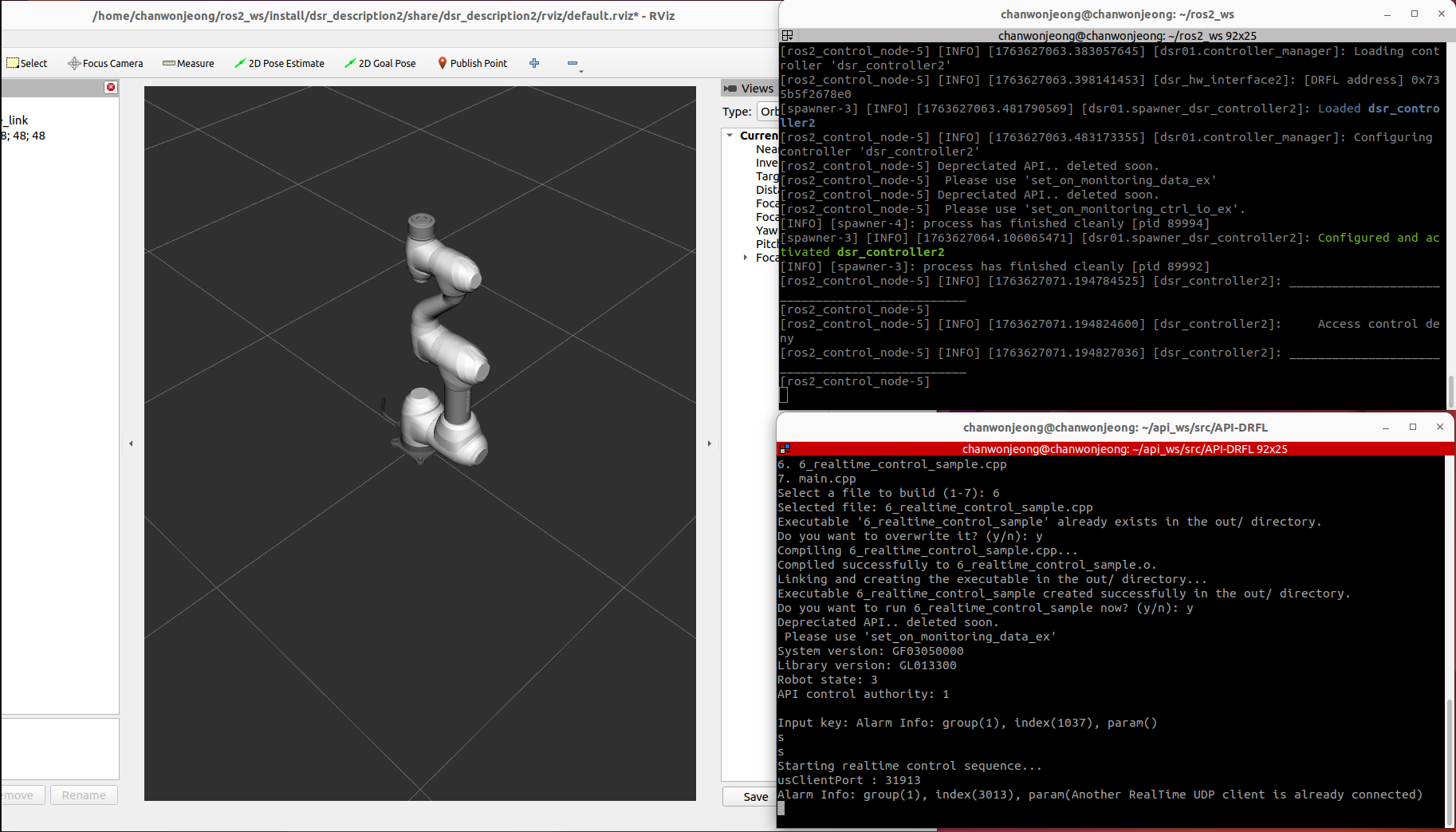
This example is located in the following path:
API-DRFL/example/Linux_64/6_realtime_control_sample.cpp
See the example on the Doosan Robotics API-DRFL GitHub.
Watch the full walk-through on the Doosan Robotics Official Youtube.
Caution
This video is provided to help better understand the tutorial.
Please note that when performing the actual tutorial, real-time control is not supported in simulator mode and can only be executed on a real robot.
Watch the real robot run on the Doosan Robotics Official Youtube.
Setup & Global Variables
The example defines a global DRFLEx controller instance along with several flags used to track:
control authority (GRANT), TP initialization status, Stop/Pause/Resume command states and internal RT trajectory parameters.
CDRFLEx Drfl;
bool g_bHasControlAuthority   = false;
bool g_TpInitailizingComplted = false;
bool g_mStat  = false;
bool g_Stop   = false;
bool moving   = false;
Additionally, the example declares structures for quintic trajectory planning.
struct PlanParam {
    float time;
    float ps[6], vs[6], as[6];
    float pf[6], vf[6], af[6];
    float A0[6], A1[6], A2[6], A3[6], A4[6], A5[6];
};

struct TraParam {
    float time;
    float pos[6], vel[6], acc[6];
};
They store start/end boundary conditions and the polynomial coefficients that define smooth RT motion.
Callback Registration
Before opening the controller connection, the example registers all required callbacks.
Drfl.set_on_homming_completed(OnHommingCompleted);
Drfl.set_on_monitoring_data(OnMonitoringDataCB);
Drfl.set_on_monitoring_data_ex(OnMonitoringDataExCB);
Drfl.set_on_monitoring_access_control(OnMonitroingAccessControlCB);
Drfl.set_on_tp_initializing_completed(OnTpInitializingCompleted);
Drfl.set_on_log_alarm(OnLogAlarm);
Drfl.set_on_tp_popup(OnTpPopup);
Drfl.set_on_tp_log(OnTpLog);
Drfl.set_on_tp_progress(OnTpProgress);
Drfl.set_on_tp_get_user_input(OnTpGetuserInput);
Drfl.set_on_rt_monitoring_data(OnRTMonitoringData);
Drfl.set_on_program_stopped(OnProgramStopped);
Drfl.set_on_disconnected(OnDisConnected);
Access Control Monitoring
  void OnMonitroingAccessControlCB(const MONITORING_ACCESS_CONTROL eTrasnsitControl) {
    switch (eTrasnsitControl) {
        case MONITORING_ACCESS_CONTROL_REQUEST:
            assert(Drfl.ManageAccessControl(MANAGE_ACCESS_CONTROL_RESPONSE_NO));
            break;
        case MONITORING_ACCESS_CONTROL_GRANT:
            g_bHasControlAuthority = true;
            break;
        case MONITORING_ACCESS_CONTROL_DENY:
        case MONITORING_ACCESS_CONTROL_LOSS:
            g_bHasControlAuthority = false;
            if (g_TpInitailizingComplted) {
                Drfl.ManageAccessControl(MANAGE_ACCESS_CONTROL_FORCE_REQUEST);
            }
            break;
        default:
            break;
    }
}
This callback updates GRANT/LOSS state when authority changes.
TP Initialization → Force Access Request
void OnTpInitializingCompleted() {
    g_TpInitailizingComplted = true;
    Drfl.ManageAccessControl(MANAGE_ACCESS_CONTROL_FORCE_REQUEST);
}
When the TP initializes, the program automatically sends a forced access request.
Connection & Version Information
After callback registration, the controller connection is opened:
assert(Drfl.open_connection("192.168.137.100"));

SYSTEM_VERSION tSysVerion = {'\0'};
Drfl.get_system_version(&tSysVerion);
assert(Drfl.setup_monitoring_version(1));

std::cout << "System version: "  << tSysVerion._szController << std::endl;
std::cout << "Library version: " << Drfl.get_library_version() << std::endl;
Console example:
System version: GF03050000
Library version: GL013300
Robot Mode Configuration
Real-time control requires: AUTONOMOUS mode, REAL system, AUTONOMOUS safety mode.
assert(Drfl.set_robot_mode(ROBOT_MODE_AUTONOMOUS));
assert(Drfl.set_robot_system(ROBOT_SYSTEM_REAL));
RT Session Activation
When the user presses `s` in the main loop, the program starts the entire real-time control sequence at once.
It connects the RT channel, configures RT output parameters, switches the robot to AUTONOMOUS + AUTONOMOUS safety mode,
starts RT control, and finally creates a high-priority real-time thread that runs realtime_task.
(connection → RT output configuration → RT start → thread creation)
case 's': {
// Start realtime control sequence (combines cases 1,2,3,4)
std::cout << "Starting realtime control sequence..." << std::endl;
// Step 1: Connect RT control
Drfl.connect_rt_control("192.168.137.100");
std::cout << "RT control connected" << std::endl;
// Step 2: Set RT control output
std::string version = "v1.0";
float period = 0.001f; // 1 ms RT cycle
int losscount = 4; // allowed packet loss count
Drfl.set_rt_control_output(version, period, losscount);
std::cout << "RT control output configured" << std::endl;
std::this_thread::sleep_for(std::chrono::microseconds(1000));
// Step 3: Set robot mode and start RT control
Drfl.set_robot_mode(ROBOT_MODE_AUTONOMOUS);
Drfl.set_safety_mode(SAFETY_MODE_AUTONOMOUS, SAFETY_MODE_EVENT_MOVE);
Drfl.start_rt_control();
std::cout << "RT control started" << std::endl;
std::this_thread::sleep_for(std::chrono::microseconds(1000));
// Step 4: Create real-time thread (realtime_task)
pthread_t rt_thread;
pthread_attr_t attr;
struct sched_param param;
pthread_attr_init(&attr);
pthread_attr_setinheritsched(&attr, PTHREAD_EXPLICIT_SCHED);
pthread_attr_setschedpolicy(&attr, SCHED_FIFO); // real-time scheduling policy
param.sched_priority = 99; // high priority
pthread_attr_setschedparam(&attr, ¶m);
int v = pthread_create(&rt_thread, &attr, realtime_task, nullptr);
if (v != 0) {
perror("Failed to create real-time thread");
std::cout << "Error: " << v << std::endl;
return 1;
}
std::cout << "Realtime thread created successfully" << std::endl;
break;
}
Open the real-time UDP channel using connect_rt_control.
Configure RT parameters (1 ms cycle time, allowed packet loss, etc.) using set_rt_control_output.
Switch the robot to ROBOT_MODE_AUTONOMOUS and SAFETY_MODE_AUTONOMOUS, then start the RT session with start_rt_control.
Configure a POSIX thread with the SCHED_FIFO real-time scheduling policy and priority 99, then create a dedicated real-time thread that runs realtime_task and streams servoj_rt commands at a 1 kHz rate.
Console example:
Starting realtime control sequence...
RT control connected
RT control output configured
RT control started
Realtime thread created successfully
Stop / Pause / Resume
While the RT loop is running, another thread (ThreadFunc) can listen for keyboard input and
send Stop / Pause / Resume commands to the controller.
int linux_kbhit(void) {
    struct termios oldt, newt;
    int ch;
    tcgetattr(STDIN_FILENO, &oldt);
    newt = oldt;
    newt.c_lflag &= ~(ICANON | ECHO);
    tcsetattr(STDIN_FILENO, TCSANOW, &newt);
    ch = getchar();
    tcsetattr(STDIN_FILENO, TCSANOW, &oldt);
    return ch;
}

uint32_t ThreadFunc(void* arg) {
    while (true) {
        if (linux_kbhit()) {
            char ch = getch();
            switch (ch) {
                case 's':
                    std::printf("Stop!\n");
                    g_Stop = true;
                    Drfl.MoveStop(STOP_TYPE_SLOW);
                    break;
                case 'p':
                    std::printf("Pause!\n");
                    Drfl.MovePause();
                    break;
                case 'r':
                    std::printf("Resume!\n");
                    Drfl.MoveResume();
                    break;
            }
        }
        std::this_thread::sleep_for(std::chrono::milliseconds(100));
    }
    return 0;
}
This allows the user to manually override robot motion during real-time execution (slow stop, pause, resume).
Quintic Trajectory Planning
Before entering the RT loop, the sample prepares two trajectories:
home → target_pose and target_pose → home
TrajectoryPlan computes A0~A5 polynomial coefficients:
// Motion parameters
float target_time = 8.0;
float posj_s[6] = {0, 0, 0, 0, 0, 0};
float posj_f[6] = {30, 30, 60, -30, -90, 30};

TraParam tra1, tra2;
PlanParam plan1, plan2;

plan1.time = target_time;
plan2.time = target_time;

memcpy(plan1.ps, posj_s, NUMBER_OF_JOINT * sizeof(float));
memcpy(plan1.pf, posj_f, NUMBER_OF_JOINT * sizeof(float));
memcpy(plan2.ps, posj_f, NUMBER_OF_JOINT * sizeof(float));
memcpy(plan2.pf, posj_s, NUMBER_OF_JOINT * sizeof(float));

float vs[6] = {0, 0, 0, 0, 0, 0};
float vf[6] = {0, 0, 0, 0, 0, 0};
float as[6] = {0, 0, 0, 0, 0, 0};
float af[6] = {0, 0, 0, 0, 0, 0};

memcpy(plan1.vs, vs, NUMBER_OF_JOINT * sizeof(float));
memcpy(plan1.vf, vf, NUMBER_OF_JOINT * sizeof(float));
memcpy(plan1.as, as, NUMBER_OF_JOINT * sizeof(float));
memcpy(plan1.af, af, NUMBER_OF_JOINT * sizeof(float));
memcpy(plan2.vs, vs, NUMBER_OF_JOINT * sizeof(float));
memcpy(plan2.vf, vf, NUMBER_OF_JOINT * sizeof(float));
memcpy(plan2.as, as, NUMBER_OF_JOINT * sizeof(float));
memcpy(plan2.af, af, NUMBER_OF_JOINT * sizeof(float));

TrajectoryPlan(&plan1);
TrajectoryPlan(&plan2);
These coefficients allow generating smooth 5th-order position/velocity/acceleration profiles.
Realtime RT Loop
The core logic of the real-time control example is implemented inside the ``realtime_task()`` function, which runs inside the high-priority RT thread.
Initialization: home position & safety mode
float home[6]   = {0, 0, 0, 0, 0, 0};
float posj_s[6] = {0, 0, 0, 0, 0, 0};
float posj_f[6] = {30, 30, 60, -30, -90, 30};
const float None = -10000;

// Set safety mode and move to home
Drfl.movej(home, 60, 60);
Drfl.set_safety_mode(SAFETY_MODE_AUTONOMOUS, SAFETY_MODE_EVENT_MOVE);
The robot first moves to the home position, and the safety mode is set to AUTONOMOUS / EVENT_MOVE before any real-time streaming starts.
RT velocity/acceleration setup
float vel[6] = {100, 100, 100, 100, 100, 100};
float acc[6] = {120, 120, 120, 120, 120, 120};

Drfl.set_velj_rt(vel);
Drfl.set_accj_rt(acc);
These define the joint velocity/acceleration bounds for real-time motion commands.
Control loop timing parameters
const int loop_period_ms = 1;
float dt = 0.001f * loop_period_ms;
std::chrono::milliseconds loop_period(loop_period_ms);

int repeat = 100000;
float ratio = 15;
double tt = dt * ratio;
loop_period_ms = 1→ 1 ms control cycle (1 kHz loop).ttis passed toservoj_rtas the trajectory time parameter.
Alternating forward/backward trajectories
The outer loop alternates between forward (plan1) and backward (plan2) trajectories:
for (int i = 0; i < repeat; i++) {
    bool flag = true;
    int count = 0;
    float time = 0;

    PlanParam* current_plan = (i % 2 == 0) ? &plan1 : &plan2;
    TraParam* current_tra   = (i % 2 == 0) ? &tra1  : &tra2;

    std::cout << "Loop " << i << ") Start position: ";
    for (size_t k = 0; k < 6; k++) {
        std::cout << current_plan->ps[k] << ", ";
    }
    std::cout << std::endl;

    while (flag) {
        auto loop_start_time = std::chrono::steady_clock::now();

        time = (++count) * dt;
        current_tra->time = time;

        TrajectoryGenerator(current_plan, current_tra);

        // (body omitted for brevity)
    }
}
For each loop:
even index (0, 2, 4, …): home → target (
plan1)odd index (1, 3, 5, …): target → home (
plan2)
Example RT console logs:
Loop 0) Start position: 0, 0, 0, 0, 0, 0,
Loop 0) End position: 30, 30, 60, -30, -90, 30,
Loop 1) Start position: 30, 30, 60, -30, -90, 30,
Loop 1) End position: 0, 0, 0, 0, 0, 0,
...
Real-time servo command (``servoj_rt``)
Inside the inner while-loop, a trajectory sample is generated and sent to the controller.
TrajectoryGenerator(current_plan, current_tra);

if (i % 2 != 0) {
    // On the return path, ignore vel/acc (position-only control)
    for (int j = 0; j < 6; j++) {
        current_tra->vel[j] = None;
        current_tra->acc[j] = None;
    }
}

Drfl.servoj_rt(current_tra->pos,
               current_tra->vel,
               current_tra->acc,
               tt);
For forward motion (even loops), position/velocity/acceleration are sent.
For return motion (odd loops), velocity and acceleration are replaced with
None(-10000), effectively switching to position-only RT control.
When the current time exceeds the planned duration, the loop ends and the final pose is printed.
if (time > current_plan->time) {
    flag = false;
    std::cout << "Loop " << i << ") End position: ";
    for (size_t k = 0; k < 6; k++) {
        std::cout << current_plan->pf[k] << ", ";
    }
    std::cout << std::endl;
    break;
}
1 kHz timing enforcement
The loop measures the elapsed time and sleeps for the remaining period to maintain a constant 1 ms cycle.
auto loop_end_time = std::chrono::steady_clock::now();
auto elapsed_time =
    std::chrono::duration_cast<std::chrono::milliseconds>(loop_end_time - loop_start_time);

if (elapsed_time < loop_period) {
    std::this_thread::sleep_for(loop_period - elapsed_time);
}
This enforces deterministic timing for the RT control loop.
Stopping RT Control
Pressing e ends RT streaming.
case 'e':
    Drfl.stop_rt_control();
    Drfl.disconnect_rt_control();
    break;
When the user presses q, the sample exits and all connections are closed.
// Cleanup
Drfl.disconnect_rt_control();
Drfl.CloseConnection();