For information on the latest version, please have a look at GL013304.
check_orientation_condition_abs
This function evaluates the absolute orientation difference between the current tool pose and the target pose along a specified axis. It determines whether the angular deviation lies within the defined minimum and maximum thresholds. The rotational difference is calculated using the Angle/Axis method, where the rotation vector expresses the shortest angular path between the current and target orientations.
Definition
DRFLEx.h within class CDRFLEx, public section (line 960)
bool check_orientation_condition(FORCE_AXIS eForceAxis,
                                 float fTargetMin[NUM_TASK],
                                 float fTargetMax[NUM_TASK],
                                 COORDINATE_SYSTEM eForceReference = COORDINATE_SYSTEM_TOOL) {
    return _check_orientation_condition_abs(_rbtCtrl, eForceAxis, fTargetMin, fTargetMax, eForceReference);
};
Parameter
Parameter Name |
Data Type |
Default Value |
Description |
|---|---|---|---|
eForceAxis |
Axis of rotation to evaluate (e.g., Rx, Ry, Rz). |
||
fTargetMin |
float[6] |
Minimum acceptable angular deviation (deg or rad). |
|
fTargetMax |
float[6] |
Maximum acceptable angular deviation (deg or rad). |
|
eForceReference |
|
Coordinate reference for orientation comparison (TOOL or BASE). |
Return
Value |
Description |
|---|---|
1 |
The condition is True (within orientation limits). |
0 |
The condition is False (outside orientation limits). |
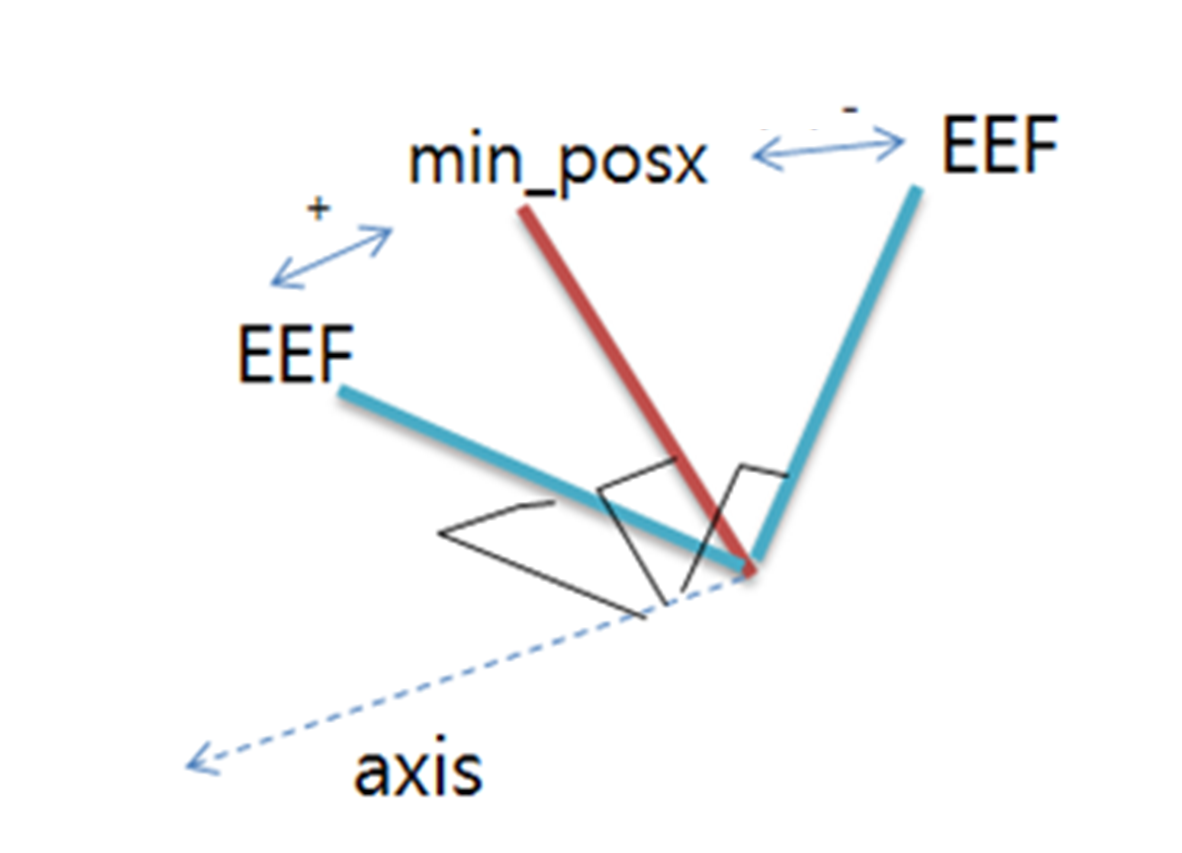
check_orientation_condition_abs
Example
#include "DRFLEx.h"
#include <cstdio>
using namespace DRAFramework;

int main() {
    CDRFLEx drfl;
    // Preconditions: Connected, servo ON, Auto or Manual mode active

    // Define target orientation range around Rx–Ry–Rz axes
    float minOri[6] = {0.f, 0.f, 0.f, -10.f, -10.f, -10.f};
    float maxOri[6] = {0.f, 0.f, 0.f, 10.f, 10.f, 10.f};

    // Check orientation deviation around Rz in TOOL coordinate
    bool cond = drfl.check_orientation_condition(FORCE_AXIS_Z, minOri, maxOri, COORDINATE_SYSTEM_TOOL);

    printf("Orientation within range: %s\n", cond ? "TRUE" : "FALSE");
    return 0;
}
In this example, the function checks whether the current tool orientation lies within ±10° of the target orientation around the Z-axis (Rz) within the TOOL coordinate frame.
Tips
Use this function to ensure alignment accuracy before task execution in both Auto and Manual modes.
Combine with check_position_condition for full 6D validation (position and orientation).
The angle units (deg or rad) depend on the system configuration.
Particularly useful in peg-in-hole, screw insertion, and teaching correction processes.