For information on the latest version, please have a look at GL013304.
move_spiral (Auto Mode)
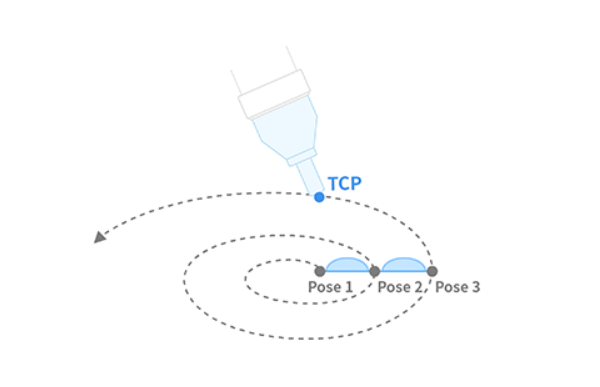
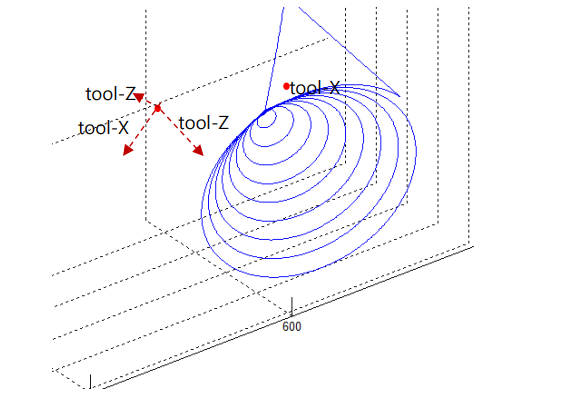
This function executes a spiral trajectory motion in which the robot’s radius gradually increases in the radial direction while moving in parallel with a rotating spiral along the axial direction. The path is formed on a plane perpendicular to the selected axis (eTaskAxis) and the spiral expands outward until it reaches the specified maximum radius and length.
Definition
DRFLEx.h within class CDRFLEx, public section (line 803)
bool move_spiral(TASK_AXIS eTaskAxis,
                 float fRevolution,
                 float fMaximuRadius,
                 float fMaximumLength,
                 float fTargetVel[2],
                 float fTargetAcc[2],
                 float fTargetTime = 0.f,
                 MOVE_REFERENCE eMoveReference = MOVE_REFERENCE_TOOL) {
    return _move_spiral(_rbtCtrl, eTaskAxis, fRevolution, fMaximuRadius,
                        fMaximumLength, fTargetVel, fTargetAcc,
                        fTargetTime, eMoveReference);
};
Parameter
Parameter Name |
Data Type |
Default Value |
Description |
|---|---|---|---|
eTaskAxis |
Axis perpendicular to the spiral surface |
||
fRevolution |
float |
Total number of spiral revolutions [rev > 0] |
|
fMaximuRadius |
float |
Final spiral radius [mm] |
|
fMaximumLength |
float |
Linear distance moved along the spiral axis [mm] |
|
fTargetVel |
float[2] |
Linear and angular velocity [mm/s, deg/s] |
|
fTargetAcc |
float[2] |
Linear and angular acceleration [mm/s², deg/s²] |
|
fTargetTime |
float |
0.0 |
Total execution time [sec] |
eMoveReference |
|
Coordinate reference frame for spiral motion (BASE / TOOL) |
Note
fRevolutionsets the number of rotations in the spiral trajectory.fMaximuRadiusdefines the final radius of the spiral.fMaximumLengthspecifies the distance traveled along the spiral axis, with negative values moving in the opposite axial direction.fTargetVelandfTargetAcccontrol the linear and angular speed profiles.When
fTargetTimeis provided, motion is timed and velocity/acceleration are ignored.eTaskAxisselects which plane the spiral lies on (e.g., TASK_AXIS_Z for XY-plane spirals).eMoveReferencedefines the reference frame (BASE or TOOL).This function does not support online blending with other motion commands.
Caution
If the rotating acceleration generated by the spiral exceeds a safe limit, the system may trigger an error for protection. Reduce
fTargetVel,fTargetAcc, orfTargetTimeaccordingly.
Return
Value |
Description |
|---|---|
0 |
Error |
1 |
Success |
Example
// Perform a spiral motion along the TOOL-Z axis
float rev = 3;       // 3 full rotations
float rmax = 30;     // Maximum radius: 30 mm
float lmax = 50;     // Moves 50 mm in Z-axis direction
float tvel[2] = {50, 50};    // Linear/Angular velocity
float tacc[2] = {100, 100};  // Linear/Angular acceleration

drfl.move_spiral(TASK_AXIS_Z, rev, rmax, lmax, tvel, tacc);
// Moves the robot in a spiral expanding outward (radius 30 mm)
// while ascending 50 mm along the Z-axis over 3 turns.
This command is commonly used for polishing, surface scanning, or coating applications where a smooth helical trajectory with radial expansion is required.