For information on the latest version, please have a look at GL013304.
movec (Auto Mode)
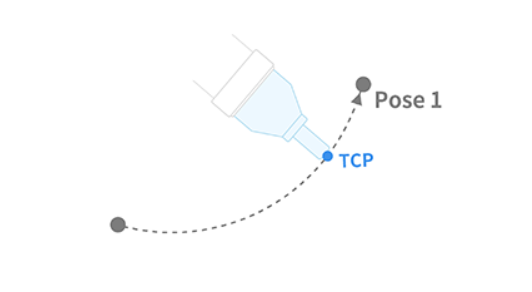
This is a function for moving the robot along an arc to the target position via a waypoint or to a specified angle from the current position based on the task space in the task space. This function is available only when ``DRCF_VERSION == 2``.
Definition
DRFLEx.h within class CDRFLEx, public section (line 780)
bool movec(float fTargetPos[2][NUM_TASK],
           float fTargetVel[2],
           float fTargetAcc[2],
           float fTargetTime = 0.f,
           MOVE_MODE eMoveMode = MOVE_MODE_ABSOLUTE,
           MOVE_REFERENCE eMoveReference = MOVE_REFERENCE_BASE,
           float fTargetAngle1 = 0.f,
           float fTargetAngle2 = 0.f,
           float fBlendingRadius = 0.f,
           BLENDING_SPEED_TYPE eBlendingType = BLENDING_SPEED_TYPE_DUPLICATE,
           MOVE_ORIENTATION eOrientation = DR_MV_ORI_TEACH,
           DR_MV_APP eAppType = DR_MV_APP_NONE) {
    return _movec_ex(_rbtCtrl, fTargetPos, fTargetVel, fTargetAcc, fTargetTime,
                     eMoveMode, eMoveReference, fTargetAngle1, fTargetAngle2,
                     fBlendingRadius, eBlendingType, eOrientation, eAppType);
};
Parameter
Parameter Name |
Data Type |
Default Value |
Description |
|---|---|---|---|
fTargetPos[0] |
float[6] |
Waypoint |
|
fTargetPos[1] |
float[6] |
Target location |
|
fTargetVel |
float[2] |
Linear Velocity, Angular Velocity |
|
fTargetAcc |
float[2] |
Linear Acceleration, Angular Acceleration |
|
fTargetTime |
float |
0.0 |
Reach Time [sec] |
eMoveMode |
|
Refer to the Definition of Constant and Enumeration Type |
|
eMoveReference |
|
Refer to the Definition of Constant and Enumeration Type |
|
fTargetAngle1 |
float |
0.0 |
angle1 |
fTargetAngle2 |
float |
0.0 |
angle2 |
fBlendingRadius |
float |
0.0 |
Radius for blending |
eBlendingType |
|
Refer to the Definition of Constant and Enumeration Type |
|
eOrientation |
|
Orientation control option of the tool |
|
eAppType |
|
Application hint for motion (if supported by controller) |
Note
If an argument is inputted to
fTargetVel(e.g.,{30, 0}), the input corresponds to the linear velocity of the motion, while the angular velocity is determined proportionally to the linear velocity.If an argument is inputted to
fTargetAcc(e.g.,{60, 0}), the input corresponds to the linear acceleration of the motion, while the angular acceleration is determined proportionally to the linear acceleration.If
fTargetTimeis specified, values are processed based onfTargetTime, ignoringfTargetVelandfTargetAcc.If the
eMoveModeisMOVE_MODE_RELATIVE,fTargetPos[0]andfTargetPos[1]are defined in the relative coordinate system of the previous position. (fTargetPos[0]is the relative coordinate from the starting point, whilefTargetPos[1]is the relative coordinate fromfTargetPos[0].)If
fTargetAngle1is more than 0 andfTargetAngle2is equal to 0, the total rotated angle on the circular path is applied tofTargetAngle1.When
fTargetAngle1andfTargetAngle2are more than 2,fTargetAngle1refers to the total rotating angle moving at a constant velocity on the circular path, whilefTargetAngle2refers to the rotating angle in the rotating section for acceleration and deceleration. In that case, the total moving anglefTargetAngle1 + 2 × fTargetAngle2moves along the circular path.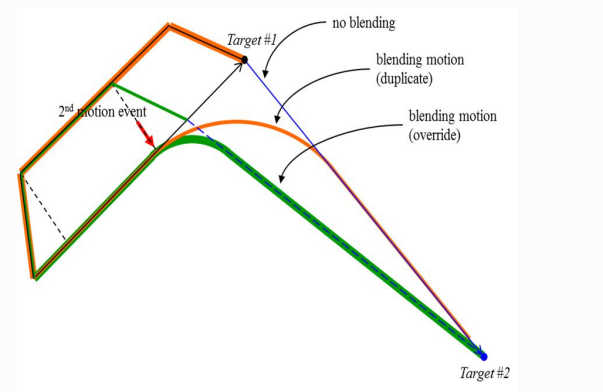
Caution
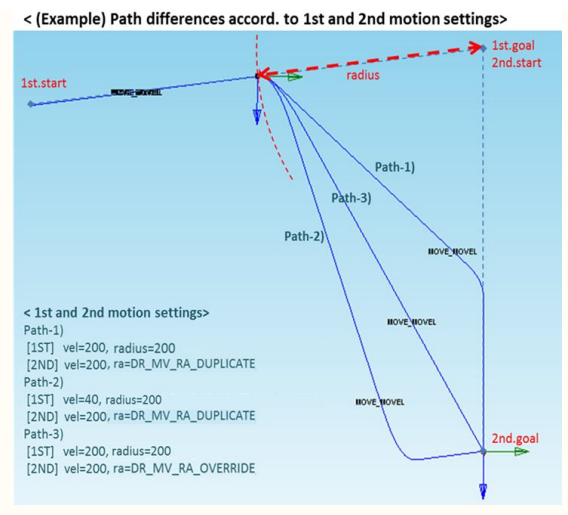
If the following motion is blended with the conditions of eBlendingType being
BLENDING_SPEED_TYPE_DUPLICATE and fBlendingRadius > 0, the preceding motion
can be terminated after the following motion is terminated first when the remaining
motion time (determined by remaining distance, velocity, and
acceleration of the preceding motion) is greater than the motion time of the
following motion. Refer to the following image for more information.
Return
Value |
Description |
|---|---|
0 |
Error |
1 |
Success |
Example
// CASE 1
float x1[2][6] = { {559,434.5,651.5,0,180,0}, {559,434.5,251.5,0,180,0} };
float tvel  = {50, 50};   // Set the task velocity to 50 (mm/sec, deg/sec).
float tacc  = {100, 100}; // Set the task acceleration to 100 (mm/sec2, deg/sec2).
drfl.movec(x1, tvel, tacc);
// Moves to x1[1] with a velocity of 50 and acceleration of 100 via x1[0] along the arc trajectory.

// CASE 2
float x1r[2][6] = { {559,434.5,651.5,0,180,0}, {559,434.5,251.5,0,180,0} };
float ttime = 5.f;
drfl.movec(x1r, 0, 0, ttime);
// Moves along the arc trajectory to x1r[1] via x1r[0] with a reach time of 5 seconds.

// CASE 3
float x1b[2][6] = { {559,434.5,651.5,0,180,0}, {559,434.5,251.5,0,180,0} };
float x2b[2][6] = { {559,234.5,651.5,0,180,0}, {559,234.5,451.5,0,180,0} };
float tvelb[2] = {50, 50};
float taccb[2] = {100, 100};
float blending_radius = 50;
drfl.movec(x1b, tvelb, taccb, 0, MOVE_MODE_ABSOLUTE, MOVE_REFERENCE_BASE, 0, 0, blending_radius);
drfl.movec(x2b, tvelb, taccb, 0, MOVE_MODE_ABSOLUTE, MOVE_REFERENCE_BASE, 0, 0, 0, BLENDING_SPEED_TYPE_DUPLICATE);
// Two consecutive arc segments are executed; the first uses a 50 mm blend radius, the second uses DUPLICATE blending.
These examples show arc motion via a waypoint, time-based arc motion, and consecutive arcs with blending.
Use fBlendingRadius and eBlendingType to control how adjacent arc segments are connected smoothly.